

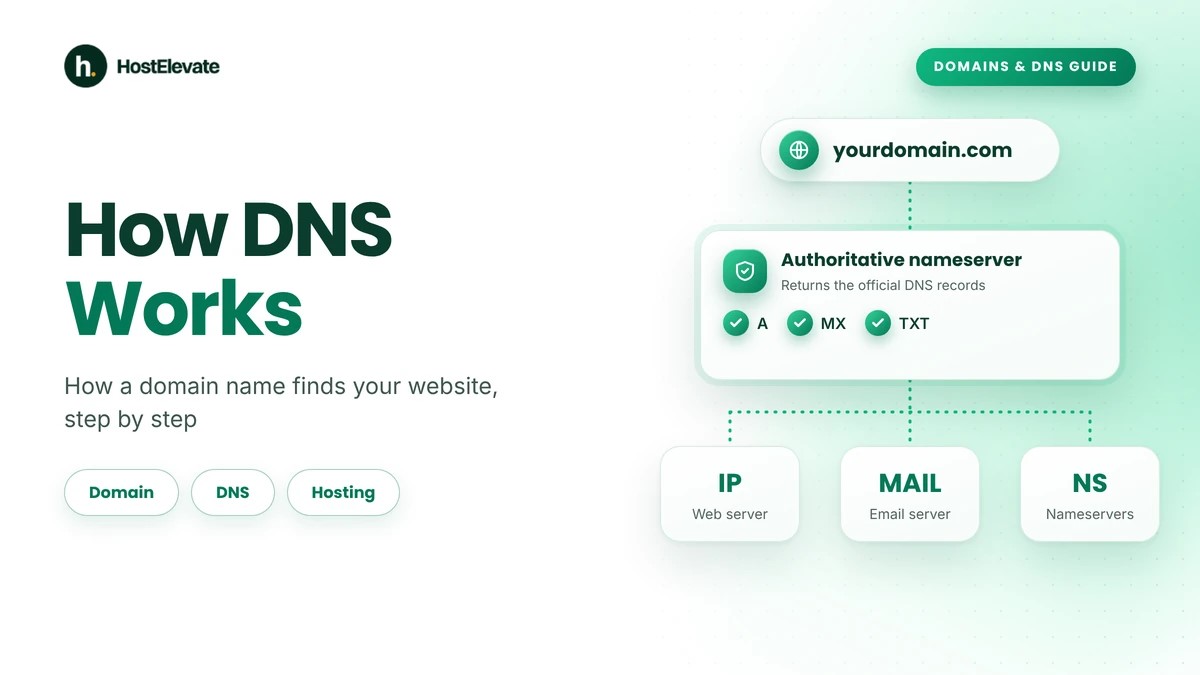
Every time someone types a website address into a browser, a quick process runs behind the scenes to find the right web server. Visitors see a simple domain name, but computers talk to each other with IP addresses, and the Domain Name System, or DNS, is what connects the two. Knowing how DNS works takes the mystery out of domains, hosting and email.
Understanding how DNS works helps you manage a domain, set up hosting, update nameservers and fix connection problems. This guide shows how DNS works by walking through the full lookup process, the different kinds of DNS servers, the common DNS records and the steps by which a domain name ends up showing your website.
Table of Contents
- What Is DNS, and Why Is It Important?
- How DNS Works for a Website, Step by Step
- What Are the Main Types of DNS Servers?
- What Are DNS Records and How Do They Work?
- What Is the Difference Between a Domain, DNS and Web Hosting?
- What Are Nameservers and How Do They Work?
- What Is DNS Propagation and How Long Does It Take?
- How to Check and Manage Your Domain’s DNS Records
- Common DNS Problems and How to Fix Them
- Frequently Asked Questions
- Summary:
What Is DNS, and Why Is It Important?
DNS stands for Domain Name System. It is a distributed naming system that turns human-readable domain names into the information computers use to find internet services, including websites and email servers. When someone enters example.com, the device must discover the right IP address before it can connect to the hosting server. An IP address might look like this:
192.0.2.10
Nobody wants to memorise a number for every website, so DNS lets people use easy names instead. That is the simplest way to explain how DNS works: it is the internet’s address book, and how DNS works behind that address book is what the rest of this guide covers.
Why is DNS important for websites?
DNS links a domain name to the services that handle its requests. Its main jobs are:
- Connecting domains to web servers: DNS records help browsers find the IP address behind a domain or hostname.
- Directing email: MX records name the mail servers that receive email for a domain.
- Managing subdomains: Owners can set up hostnames such as blog.example.com or shop.example.com.
- Supporting hosting changes: When a site moves to a new host, updating the right records sends visitors to the new server.
- Keeping services reachable: Reliable DNS helps people resolve your domain and reach the right service.
Without it, people would need IP addresses instead of familiar names, which is why how DNS works matters for anyone who owns a domain.
How DNS Works for a Website, Step by Step
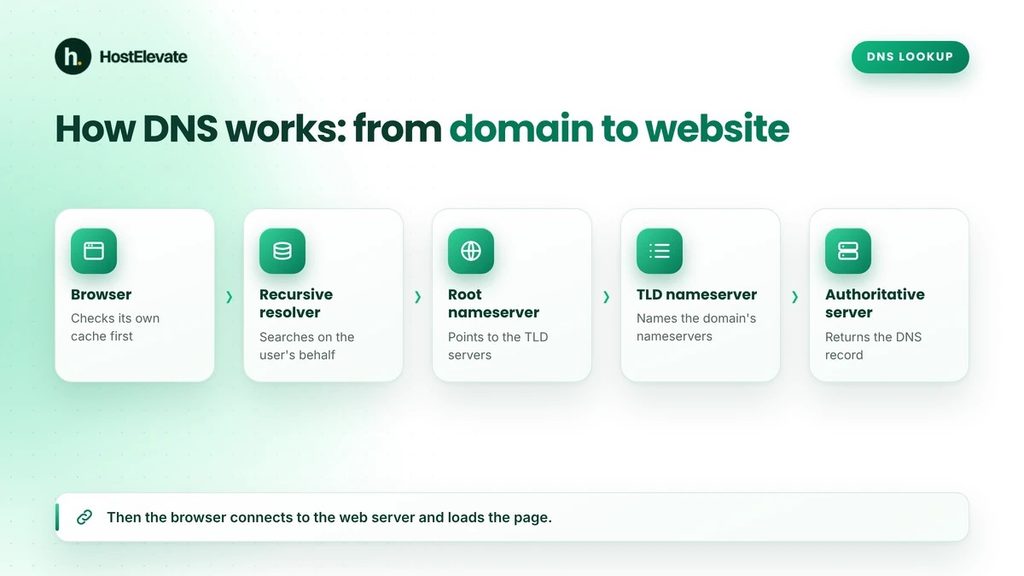
To see how DNS works in practice, look at the lookup that happens whenever a browser needs to resolve a domain name. Take someone entering example.com. The browser must find the destination before it can ask for any page content. Here is how DNS works when no cached answer is available, in six steps.
The browser checks its stored DNS information
This first step of how DNS works saves time on repeat visits. The browser and operating system first look in their own DNS caches. If a valid cached answer exists, they use it and skip the full lookup. If the answer is missing or expired, the device sends a query to a recursive DNS resolver, which is usually run by an internet provider or a public DNS service.
The recursive resolver contacts a root nameserver
This is where how DNS works becomes a hierarchy. With no cached answer, the resolver starts searching and asks a DNS root nameserver. Root servers do not normally hold the final IP address of a website. They point the resolver towards the right Top-Level Domain (TLD) servers, so a .com domain leads to the .com TLD infrastructure.
The TLD nameserver names the authoritative nameservers
Here is the point in how DNS works where the domain itself is identified. Next the resolver asks the TLD nameserver. For example.com, the .com server refers it to the authoritative nameservers responsible for that domain, which hold or serve its official DNS information.
The authoritative nameserver returns the record
This is the step of how DNS works that produces the real answer. The resolver asks the authoritative nameserver for the hostname it wants, for instance the A record for example.com. If the record exists, the server returns it. An A record holds an IPv4 address, while an AAAA record holds an IPv6 address.
The resolver returns the answer to the browser
Caching is a big part of how DNS works at scale. The resolver passes the answer back to the device and may cache it for the length of its Time to Live (TTL). The browser now has an address to connect to.
The browser connects to the web server
DNS resolution is only one part of loading a site. With the address in hand, the browser opens a connection and requests the page over HTTP or HTTPS. The web server, or a CDN in front of it, replies with the files the browser needs to display the site.
The complete DNS lookup at a glance
| Stage | What happens |
| Browser | The user enters a domain name |
| Local cache | The browser and operating system check stored DNS information |
| Recursive resolver | Receives the DNS query |
| Root nameserver | Directs the resolver towards the right TLD |
| TLD nameserver | Names the domain’s authoritative nameservers |
| Authoritative nameserver | Returns the requested DNS record |
| Recursive resolver | Returns the answer and may cache it |
| Web server | Receives the website request and serves the content |
That is the basic path by which a domain name leads visitors to the correct website, and it sums up how DNS works for any site.
What Are the Main Types of DNS Servers?
Each kind of DNS server has its own job in resolution, and knowing the roles makes how DNS works easier to follow and troubleshooting simpler.
Recursive DNS resolver
A recursive resolver takes queries from client devices and works out the answers. It can reply from its cache or ask other DNS servers. Common public examples are Google Public DNS and Cloudflare’s 1.1.1.1.
Root nameserver
Root nameservers sit at the top of the DNS hierarchy. They refer resolvers to the right TLD nameservers instead of returning a website’s final IP address. The root system is spread across the world and is central to how DNS works.
TLD nameserver
A TLD nameserver handles one domain extension, such as .com, .net, .org, .info or .uk. It helps resolvers find which authoritative nameservers manage a registered domain.
Authoritative nameserver
An authoritative nameserver holds the definitive records for the domain or DNS zone it manages, such as A, AAAA, MX, CNAME and TXT records. When you edit records at your DNS host, you are editing what that provider’s authoritative servers publish.
Remember the difference: A recursive resolver searches for answers on behalf of users, while an authoritative nameserver gives the official information for its own domain or zone.
What Are DNS Records and How Do They Work?
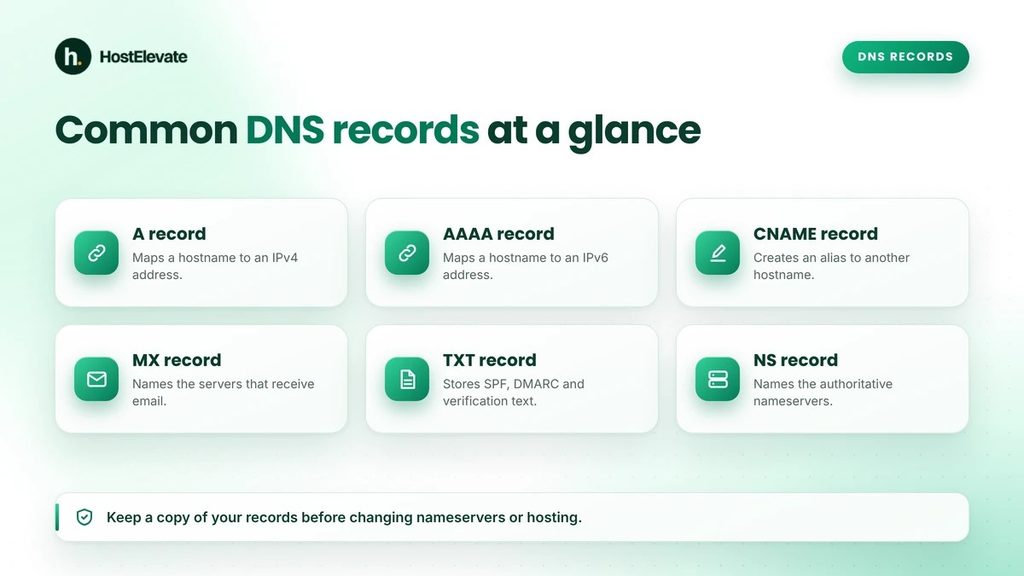
DNS records are entries stored in a DNS zone, and each one gives specific information about a domain, hostname or service. Some direct website traffic, while others support email, domain verification and other services, so records are a core part of how DNS works.
A record
An A record connects a hostname to an IPv4 address and is the usual way to point a domain at a hosting server.
| Type | Name | Value |
| A | example.com | 192.0.2.10 |
AAAA record
An AAAA record does the same job for an IPv6 address. Sites that support IPv6 can publish AAAA records alongside their A records.
CNAME record
A CNAME record creates an alias from one hostname to another.
| Type | Name | Value |
| CNAME | www.example.com | example.com |
Here www.example.com uses example.com as its canonical name. A CNAME points to another hostname rather than storing an IP address. DNS rules restrict placing a CNAME beside other record types at the same name, so read your DNS provider’s guidance before creating one.
MX record
An MX record names the mail servers that receive email for a domain, with a priority value that sets the order in which servers are tried.
| Type | Name | Value |
| MX | example.com | mail.example.com |
If you use a separate email provider, your MX records must point to that provider’s mail servers.
TXT record
TXT records store text information for a domain. They are commonly used for SPF email authentication, DMARC policies, domain ownership checks and third-party service verification.
NS record
NS records name the authoritative nameservers for a DNS zone. They matter when you connect a domain to a DNS host or delegate a subdomain, and changing a domain’s nameservers changes which provider is authoritative.
PTR record
A PTR record supports reverse DNS, which maps an IP address back to a hostname. It is especially relevant to mail-server setup.
SOA record
An SOA (Start of Authority) record holds administrative details about a zone, such as the primary nameserver, the responsible party, a serial number and timing values.
Common DNS records at a glance
| Record | Main purpose |
| A | Maps a hostname to an IPv4 address |
| AAAA | Maps a hostname to an IPv6 address |
| CNAME | Creates an alias to another hostname |
| MX | Identifies incoming mail servers |
| TXT | Stores verification and policy text |
| NS | Identifies authoritative nameservers |
| PTR | Supports reverse DNS lookup |
| SOA | Holds administrative zone information |
Knowing these records and how DNS works with them lets you manage hosting, email and domain settings without touching unrelated ones.
What Is the Difference Between a Domain, DNS and Web Hosting?
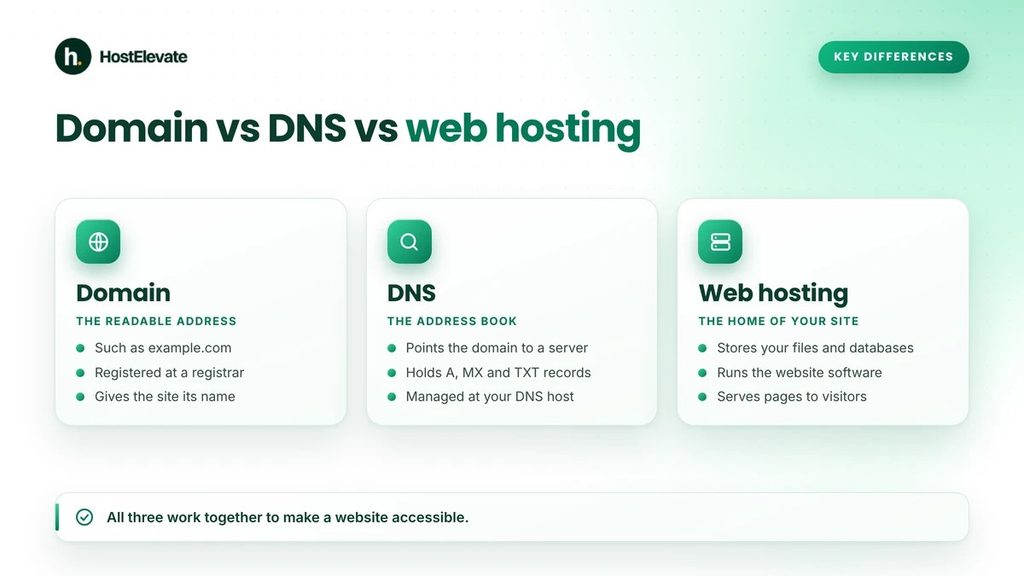
Domain registration, DNS and web hosting are connected, but they are three different services. Many people assume that buying a domain creates a website, when in fact each part does its own job, which is central to how DNS works alongside hosting.
What is a domain name?
A domain name is the readable address people use to find an online destination, such as example.com. You register it through a registrar, which manages the registration under the rules of the relevant domain registry. If you are ready to pick one, you can start with HostElevate domain registration and check domain pricing before you buy.
What is DNS?
How DNS works here is simple: it connects the domain and its hostnames to the right internet services. It tells resolvers where to find the authoritative information and supplies the records that locate web servers, email services and other resources.
What is web hosting?
Web hosting provides the server space and resources that store and deliver website files and applications. A hosting server may hold WordPress files, images and documents, databases, application code and site configuration. When a visitor reaches the server, it handles the request and delivers the site. HostElevate web hosting includes cPanel on every account and free SSL, so the hosting side is covered in one place.
How do the three work together?
For a site on example.com:
- The domain gives the site its readable address.
- DNS points the domain to the right server or service.
- Web hosting stores and serves the content.
How DNS works makes it possible to avoid keeping everything with one company. You can leave a domain at its current registrar and update its DNS to point at a new host, so a domain transfer is optional rather than required.
What Are Nameservers and How Do They Work?
To understand how DNS works, you need to know that nameservers are DNS servers that give authoritative information about the domains or zones they manage. When a domain is registered, its nameserver settings say which DNS service should answer authoritative queries for it. A DNS provider might give you two nameservers such as:
ns1.example-dns.com
ns2.example-dns.com
These are example hostnames, not real nameservers. Once the domain uses a provider’s nameservers, that provider’s DNS zone becomes responsible for the domain’s authoritative records.
What happens when you change nameservers?
Changing nameservers changes the DNS provider in charge of the domain, which shows how DNS works through delegation. Before you do it:
- Create or import the required DNS records at the new provider.
- Check the website’s A and AAAA records.
- Verify the MX records for email.
- Copy the SPF, DKIM and DMARC records.
- Review subdomain records.
- Check any third-party verification records.
If the new zone is incomplete, your website or email can stop working after the switch.
Nameservers vs DNS records
The two terms are closely linked but not the same.
| Nameservers | DNS records |
| Identify the authoritative DNS provider | Define information about hostnames and services |
| Control DNS delegation | Control how specific queries are answered |
| Usually changed at the registrar | Managed inside the authoritative DNS zone |
| Point resolvers to authoritative DNS | Provide A, MX, CNAME and other answers |
For more detail, see the Cloudflare nameservers documentation.
What Is DNS Propagation and How Long Does It Take?
How DNS works with caching explains propagation, which describes how a DNS change becomes visible across different resolvers over time. When you update a record, not every resolver fetches the new value immediately, mainly because DNS answers are cached.
What is DNS TTL?
TTL stands for Time to Live, and it is key to how DNS works with caches. It sets how long a resolver may cache a record before it should refresh it.
| TTL | Approximate duration |
| 300 | 5 minutes |
| 900 | 15 minutes |
| 1800 | 30 minutes |
| 3600 | 1 hour |
| 86400 | 24 hours |
If a resolver cached the old record with a TTL of 3600 seconds, it may keep using that answer until the entry expires. Behaviour varies, because resolvers cached the record at different times, and negative caching can affect newly created records too.
Does DNS always take 24 to 48 hours to update?
No. There is no universal 24 to 48 hour rule. The time depends on existing cache entries, record TTLs, resolver behaviour, delegation and the kind of change. A short TTL can show up quickly on many resolvers while others still hold an older answer, and changing nameservers differs from editing one A record because delegation data is involved as well.
How to check DNS propagation
Use DNS lookup tools or command-line utilities to compare answers from different resolvers and see how DNS works in practice:
dig A example.com
dig NS example.com
dig MX example.com
Replace example.com with your own domain. If several resolvers give the same answer, your change is visible consistently.
How to Check and Manage Your Domain’s DNS Records
Because of how DNS works, you manage DNS records with whichever provider runs your domain’s authoritative DNS. That may be your hosting provider, your registrar or an outside DNS service.
Check DNS records in cPanel
If your domain uses cPanel’s DNS, you may be able to manage its zone in the Zone Editor.
- Log in to cPanel and open Zone Editor.
- Find the domain you want to manage and select Manage.
- Review the existing records.
- Add or edit the record you need.
- Save your changes.
What you can do depends on your hosting provider’s setup and your account permissions.
Check DNS records with command-line tools
The dig utility is handy for querying DNS:
dig A example.com
dig AAAA example.com
dig MX example.com
dig TXT example.com
Another common tool is nslookup, for example nslookup example.com. These tools help you spot wrong records, missing answers and differences between resolvers.
Update DNS carefully
Before you change any DNS setting, write down the existing records. This matters most when moving a website to another host or changing nameservers, because a wrong change can interrupt email, subdomains and verification services as well as the site. If you are moving a whole site, HostElevate’s free website migration moves files, databases and email together and keeps the old site live until the new one is verified, so the DNS part of the move stays predictable.
Common DNS Problems and How to Fix Them
DNS faults can stop a website loading even when the hosting server is healthy, and knowing how DNS works makes them easier to fix. These are the most common ones.
The domain is not resolving
An error such as DNS_PROBE_FINISHED_NXDOMAIN or ERR_NAME_NOT_RESOLVED means the hostname may have no valid DNS answer. Possible causes include:
- A misspelt domain
- Missing A or AAAA records
- Wrong nameserver delegation
- An expired or inactive registration
- Cached negative responses
Check the registration status, the authoritative nameservers and the required records first, following how DNS works from the top down.
An incorrect A record
If an A record points to the wrong IP address, visitors reach the wrong server. Compare the record at your authoritative DNS provider with the address your host gave you, and confirm the right destination before you change it.
The site works without www but not with it
The root domain and its www hostname can have separate records. example.com may have a valid A record while www.example.com has a missing or wrong CNAME or A record, so review both.
The site breaks after changing nameservers
This usually means the new DNS provider lacks some records, which is a common surprise for people still learning how DNS works. Check the new zone for A and AAAA, CNAME, MX, TXT and subdomain records, and confirm the registrar has the correct nameservers.
Email stops after a DNS change
Review the MX records and your email authentication records. The new authoritative provider must hold every record your email service needs. Changing website hosting does not mean you must change your email provider.
DNS changes are not visible everywhere
If some networks show the new record and others show the old one, caching is the likely cause, as how DNS works with TTLs explains. Check the TTL, query several resolvers and consider negative caching if the hostname did not exist before. Cloudflare’s DNS troubleshooting guide has more help with common resolution problems. If a problem still does not add up, you can ask the HostElevate team through the contact page.
Frequently Asked Questions
What does DNS stand for?
DNS stands for Domain Name System, which turns domain names into the information computers use to find internet services.
How does DNS find a website?
It resolves a domain name to an IP address so a browser can connect to the website’s server.
What is the difference between DNS and nameservers?
DNS is the overall naming system, while nameservers are the servers that give authoritative DNS information for particular domains.
How long does DNS propagation take?
It depends on TTLs, resolver caching, delegation and the type of change, so there is no fixed time for every domain.
Can I use one provider for my domain and another for hosting?
Yes, you can register a domain with one company and host the site with another by setting the right DNS records or nameservers.
Summary:
Learning how DNS works starts with one idea: DNS connects human-readable domain names with the information computers need to find websites and other services. When someone enters a domain, DNS resolution finds the destination before the browser connects to the web server.
The process involves recursive resolvers, root nameservers, TLD nameservers and authoritative nameservers, while records such as A, AAAA, CNAME, MX, TXT and NS each play their own part in directing traffic and email. Knowing how DNS works, along with nameservers, records and TTL, helps you manage domains, set up hosting and fix connection problems.
If you are launching a new site or choosing a host, take a look at HostElevate and see what each plan includes.