
When business emails land in spam instead of the inbox, the problem can affect customer communication, password resets, order confirmations, and important enquiries. One possible cause is incorrect email authentication. SPF, DKIM, and DMARC are three DNS-based mechanisms that help receiving mail servers assess whether messages are authorised and whether the sending domain can be trusted. Understanding how email authentication works is an important step toward better email deliverability.
In this guide, you will learn what SPF, DKIM, and DMARC mean, how to set up email authentication correctly, and how to troubleshoot common failures. Whether you use cPanel email or a separate email provider, these practical steps will help you find configuration problems and build a more reliable email setup.
Table of Contents
- What Are SPF, DKIM, and DMARC, and Why Is Email Authentication Important?
- How Does SPF Email Authentication Work?
- How Does DKIM Protect Your Domain?
- What Is a DMARC Record, and How Does It Work?
- How to Set Up SPF, DKIM, and DMARC for Your Domain
- Common Email Authentication Errors and How to Fix Them
- How to Test Email Authentication and Improve Deliverability
- Best Practices for Reliable Business Email Delivery
- Frequently Asked Questions
- Summary:
What Are SPF, DKIM, and DMARC, and Why Is Email Authentication Important?
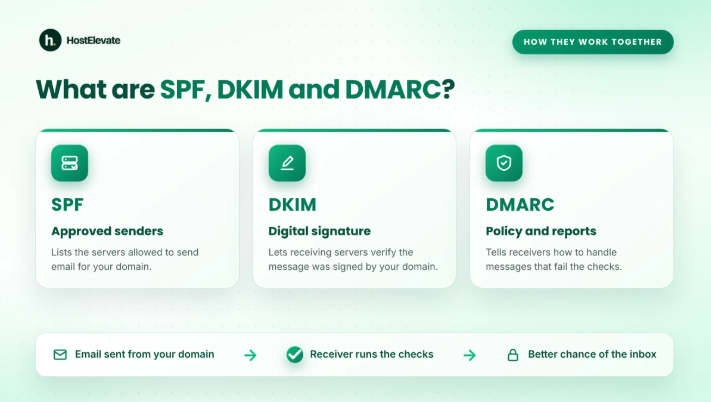
Email authentication is the set of standards that lets receiving mail servers check whether a message really came from the domain it claims to come from. SPF, DKIM, and DMARC are the three standards most domains rely on. They work together, but each performs a different function.
SPF (Sender Policy Framework) identifies which mail servers are authorised to send email for a domain. DKIM (DomainKeys Identified Mail) adds a cryptographic signature that receiving systems can verify. DMARC (Domain-based Message Authentication, Reporting, and Conformance) tells receiving systems how to handle messages that fail authentication checks and can provide reports about domain usage.
Email authentication helps protect against domain impersonation and supports email deliverability. Google’s email sender guidelines say that all senders to Gmail must set up SPF or DKIM, while bulk senders (more than 5,000 messages a day) must set up SPF, DKIM, and DMARC. However, passing authentication checks does not guarantee inbox placement: sender reputation, recipient preferences, message content, and other filtering signals also matter.
How Does SPF Email Authentication Work?
SPF allows a domain owner to publish a DNS record that identifies the servers authorised to send email for that domain. When a receiving mail server checks an incoming message, it compares the sending server with the domain’s SPF policy. This makes SPF the first layer of email authentication for most domains.
For example, if yourcompany.com sends email through its hosting server and a separate email marketing platform, the SPF policy must include both sending services. If a legitimate service is missing, its messages may fail SPF checks.
An SPF record is published as a DNS TXT record. Its exact value depends on your mail server and every service authorised to send on your behalf.
Important SPF considerations include:
- Publish only one SPF policy for a given domain name.
- Include all legitimate sending services that need authorisation.
- Remove obsolete services when they no longer send email for your domain.
- Avoid copying an SPF record from another domain without verifying the required values.
- Review the policy before changing it so you do not accidentally block legitimate email.
If your domain uses cPanel hosting, check the available email authentication tools or ask your hosting provider for the correct SPF record. If you use several email services, coordinate their requirements before you edit DNS.
How Does DKIM Protect Your Domain?
DKIM adds a digital signature to outgoing messages. The sending system signs selected message information with a private key, while a matching public key is published in DNS. Receiving mail servers use that public key to verify the signature.
A valid DKIM signature helps show that the message was signed by a domain authorised to use that key, and that the signed content has not been changed in a way that breaks the signature. It does not prove by itself that the message is harmless or that the sender’s identity is legitimate.
To configure DKIM, get the required settings from your email provider. Depending on the service, the public key may be published as a TXT or CNAME record under a selector-specific DNS name.
Keep these points in mind:
- Enable DKIM signing for each sending service that supports it.
- Publish the exact DNS record supplied by the provider.
- Allow time for DNS propagation after you make changes.
- Verify that outgoing messages contain a valid DKIM signature.
- Do not delete existing DKIM records until you know which services depend on them.
For a cPanel mailbox, the Email Deliverability interface can help you review and set up DKIM for the domain. See cPanel’s guide to Email Deliverability for details. If a third-party service sends messages for your domain, follow that service’s own DKIM instructions as well.
What Is a DMARC Record, and How Does It Work?
DMARC builds on SPF and DKIM by checking whether the domain authenticated through those mechanisms aligns with the domain shown in the message’s visible From address. It also lets the domain owner publish a policy that describes how receiving systems should handle messages that fail DMARC evaluation. It is the layer of email authentication that ties SPF and DKIM together.
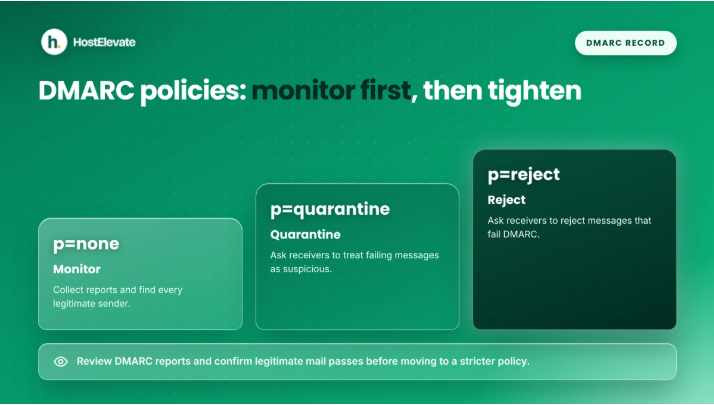
A DMARC record is published in DNS as a TXT record at _dmarc.yourcompany.com. The policy is commonly set to one of these values:
- p=none requests monitoring without asking receivers to quarantine or reject messages based on the DMARC policy.
- p=quarantine requests that failing messages be treated as suspicious, often by sending them to spam or quarantine.
- p=reject requests that failing messages be rejected.
A monitoring policy is a useful starting point while you identify every legitimate sending source. Review DMARC reports and confirm that legitimate mail passes authentication and alignment before you move to a stricter policy.
For example, a basic monitoring record may look like this:
v=DMARC1; p=none; rua=mailto:dmarc-reports@yourcompany.com
This is an example, not a universal record to copy without checking. The reporting address must be valid and set up to receive reports, and an external reporting destination may need extra authorisation. Consider privacy and report-processing requirements before you turn on reporting.
How to Set Up SPF, DKIM, and DMARC for Your Domain
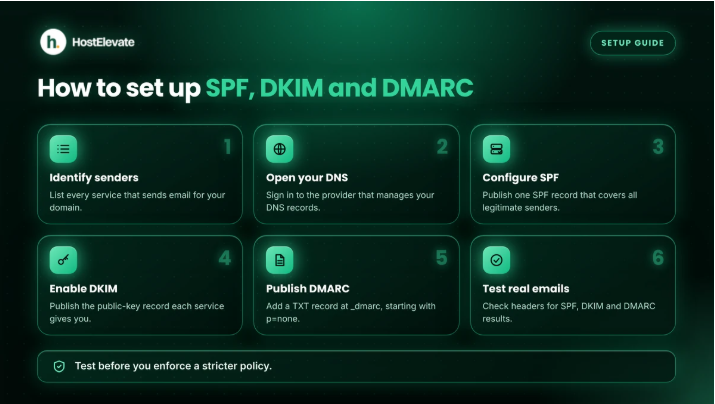
Correct setup starts with identifying every service that sends email for your domain. Publishing records without understanding your sending configuration can cause legitimate messages to fail email authentication. Follow these six steps.
Step 1: Identify your email providers
List the systems that send messages using your domain, including hosting email, contact forms, transactional email, and marketing platforms. Check which domain each service uses for SPF and DKIM authentication.
Step 2: Open your DNS management interface
Sign in to the provider that manages your domain’s authoritative DNS records. This may be your domain registrar, hosting company, or a separate DNS provider. If you use cPanel, its Zone Editor may be available, depending on the server configuration.
Step 3: Configure SPF
Get the SPF value from your email provider and make sure it authorises all legitimate sending services. Check for an existing SPF record before you add or change one. Do not create a second SPF TXT record for the same domain.
Step 4: Enable DKIM signing
Follow the instructions from each email service that sends messages for your domain. Publish the required public-key record and confirm that the service is signing outgoing mail.
Step 5: Publish a DMARC record
Create the DMARC TXT record at the correct DNS name. Start with a monitoring policy if you need to discover legitimate senders, then review the results before you consider quarantine or rejection.
Step 6: Test before enforcing a stricter DMARC policies
Send test messages to accounts you control and examine their authentication results. Check that legitimate mail passes SPF or DKIM and that DMARC alignment works as expected. Resolve failures before you tighten your policy.
HostElevate offers web hosting with cPanel, including free SSL and business email on your own domain. Available email features and DNS controls depend on the plan you choose and your domain’s configuration, so confirm the exact settings with your provider before you make changes.
Common Email Authentication Errors and How to Fix Them
When SPF, DKIM, or DMARC fails, check the authentication results and DNS configuration before you change records. Common email authentication problems include:
| Problem | What to check |
| SPF fails | Confirm the sending service is authorised and that the correct SPF record is published. |
| Multiple SPF records | Combine the legitimate mechanisms into one valid SPF policy instead of publishing conflicting records. |
| DKIM fails | Verify the selector, public key, signing configuration, and published DNS record. |
| DMARC fails | Check whether SPF or DKIM passes and aligns with the visible From domain. |
| Messages still reach spam | Review sender reputation, message content, recipient complaints, and other provider requirements. |
| Recent DNS changes do not appear | Confirm the authoritative DNS provider and allow time for changes to propagate. |
Do not make random changes to authentication records when a message fails. Inspect the message’s authentication results, identify which domain was checked, and compare the results with your actual email configuration.
If your domain sends through several providers, involve the relevant provider or DNS administrator before you remove records. A change meant to fix one service can break another service that relies on the same domain.
How to Test Email Authentication and Improve Deliverability
After you configure the records, verify that they work in real messages. A DNS record that appears in a lookup does not, by itself, prove that every email service is signing or authenticating messages correctly. Testing your email authentication is the only way to be sure.
Inspect message headers
Send a test message to an inbox you control. Open the message’s original source or full headers and look for authentication results showing the SPF, DKIM, and DMARC outcomes. The exact display depends on the receiving email service.
Check DNS records
Use your DNS provider’s tools or a reputable DNS lookup service to confirm that the expected TXT and CNAME records are visible. Check the exact hostname and selector rather than searching only for the root domain.
Review DMARC reports
If DMARC reporting is turned on, review the aggregate reports to identify sending sources and failures. Reports can help you find forgotten applications, unauthorised senders, and misconfigured services.
Monitor sending reputation
Email authentication is only one part of deliverability. Send messages to recipients who expect them, keep mailing lists clean, avoid deceptive subject lines, and follow the consent and unsubscribe requirements that apply to promotional email.
If your website sends contact-form notifications, password resets, or order messages, confirm that the application uses a properly authenticated sending service. If you need hosting for a WordPress website, you can also review HostElevate’s WordPress hosting while you check the email setup that suits your site.
Best Practices for Reliable Business Email Delivery
Once email authentication is in place, keep it accurate as your email setup changes.
- Document authorised senders: Keep a current list of the platforms and servers permitted to send email for your domain.
- Maintain SPF carefully: Update the policy when sending services change and avoid multiple SPF records.
- Rotate DKIM keys appropriately: Follow your email provider’s key-management and rotation guidance.
- Review DMARC reports: Investigate unexpected sources and fix legitimate failures before you enforce a stricter policy.
- Use secure mail connections: Turn on supported TLS settings and use secure, authenticated connections between mail apps and servers.
- Monitor complaints and bounces: Investigate delivery failures and remove invalid recipients from mailing lists.
- Keep website forms protected: Prevent abuse of contact forms and configure applications to send through a suitable authenticated service.
- Check changes before rollout: Test email authentication after switching providers, migrating hosting, or changing DNS.
If you are registering a new domain, you can review HostElevate domain registration and plan your email authentication alongside your hosting setup. If you are moving from another host, HostElevate’s free website migration moves your email with your site, and you should re-check your records afterwards. For a wider overview of the company and its services, visit the HostElevate homepage.
Frequently Asked Questions
What is email authentication?
Email authentication is a group of DNS-based standards, mainly SPF, DKIM, and DMARC, that help receiving servers check that a message is genuinely authorised by the domain it claims to come from.
Do SPF, DKIM, and DMARC stop emails from going to spam?
They help authenticate email and reduce spoofing, but inbox placement also depends on sender reputation, message quality, and recipient filtering.
Do I need SPF, DKIM, and DMARC for my domain?
All three are recommended for strong email authentication. Gmail requires SPF or DKIM from all senders, and requires SPF, DKIM, and DMARC from bulk senders who send more than 5,000 messages a day to Gmail accounts.
Can I set up SPF, DKIM, and DMARC in cPanel?
You may be able to manage some records through cPanel’s Email Deliverability interface, but the exact settings depend on your email provider and DNS host.
How long does email authentication take to work after a DNS change?
It depends on DNS caching, record TTLs, and provider behaviour, so verify the published records instead of assuming a fixed time.
What should I do if DMARC fails even though SPF passes?
Check whether the SPF-authenticated domain aligns with the visible From domain, and inspect DKIM alignment as an alternative route to a DMARC pass.
Summary:
SPF, DKIM, and DMARC work together to give you reliable email authentication for messages sent from your domain. SPF identifies authorised sending servers, DKIM provides a verifiable signature, and DMARC applies a policy based on authentication and domain alignment.
To improve email deliverability, identify every legitimate sending service, publish the correct DNS records, test real messages, and review reports before you enforce a stricter DMARC policy. Remember that email authentication is an important foundation, not a guarantee that every message reaches the inbox. Regular monitoring, responsible sending practices, and a correctly configured hosting and email environment all contribute to more dependable business communication.